Today’s tokensLocal usage
2.864M
Codex2.647M
WorkBuddy217K
Equivalent API cost estimate$4.28

Today’s usage. What’s left.
Together in one small desktop window.
Fewer pages to check. More focus on the work.
Windows x64 · v0.1.28 · 10.9 MB / macOS · Intel (x86_64) · v0.1.28 · 7.1 MB / macOS · Apple Silicon (arm64) · v0.1.28 · 6.7 MB

Start with the tools you use
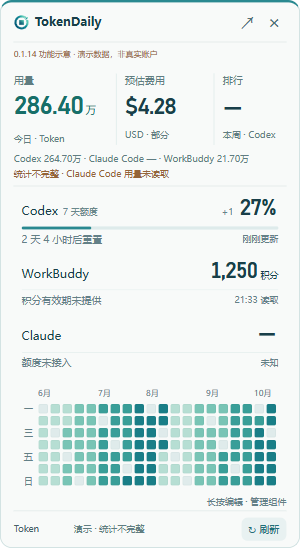
Today’s usage. Remaining quota. The next reset.
Every number has a clear place.
2.864M
27%
Quota remaining1,250credits
Account balance · Read-onlyLook back at your usage habits.
Arrange the view to feel like yours.
Explore a day. Missing records stay blank, so each number reflects a record.
Select a day to explore sample usage
Drag the cards into an order that works for you.
Interactive demo · Press and hold in the app to edit cards
Local monitoring needs no website account. Costs and history are processed on your device. Quota and credit queries connect to the relevant service.
Local monitoring uploads nothing by defaultYour everyday records stay on your device.
Joining the leaderboard is a separate choiceOnly necessary usage and deduplication data sync after consent.
Conversations and raw logs stay outNo conversations, third-party credentials or raw logs are uploaded.
Join the all-tools and per-tool boards to share your activity with the community.
Explore the community leaderboardHonors guide


 Stellar
 Elite
Elite Advanced
 Rising
Local tokens, account quotas and credits are separate.
Know what works and what still needs validation.
| Tool | Local usage | Quota / credits | Status |
|---|---|---|---|
| CCodex | Daily tokens and usage history | Remaining quota and reset times reported by the source | Supported |
| WWorkBuddy | Daily tokens and usage history | Read-only credit queries after official web sign-in | Supported |
| TTRAE CN | Local tokens and usage history | Read-only credit queries after official web sign-in | Supported |
| ✳Claude Code | Local Claude Code tokens and history | Subscription quota and reset times | Verified on Windows / Intel Mac |
Version 0.1.28 is available for Windows x64, Intel Mac and Apple Silicon, with a Chinese app interface. Local Claude Code usage and subscription quota are verified on Windows and Intel Mac; Apple Silicon on-device operation is unvalidated. Claude web and desktop chat tokens are not included. Tokens include cache usage and follow Beijing time; TRAE CN records may contain restored/synced sessions. Both Mac test builds lack an Apple Developer ID signature and notarization and require manual installation and updates.
Choose the Windows, Intel Mac or Apple Silicon beta for your computer. On Mac, open the DMG and drag TokenDaily into Applications. Local monitoring needs no account.
Choose sources in settings. Codex uses your local CLI sign-in. WorkBuddy reads local logs and TRAE CN reads local records; each requires separate official web sign-in to show credits.
Turn on the widget, drag cards to sort, and hold to edit. Open it from the tray or assign your own shortcut in settings. Choose separately whether to join the leaderboard.
Usage, quotas, privacy and accounts.
Find the details here.
Yes. It is currently a free Windows x64 beta. Your AI services’ own accounts and subscription charges are separate.
Version 0.1.28 monitors local Codex, WorkBuddy, TRAE CN and Claude Code usage. Claude quotas prefer a valid Code subscription sign-in and show the windows and reset times returned by that source. Without a valid sign-in, the app falls back to Desktop quota records; missing reset times remain unknown. Exact Claude web and desktop chat tokens are not connected. Other TRAE versions remain unverified.
Tokens come from locally readable records, include cache usage and follow Beijing calendar days. Codex quota and WorkBuddy/TRAE credits come from their account services and cannot be inferred from tokens. TRAE local records can include restored or synced sessions, so they are not guaranteed to be device-exclusive or a complete account total.
The widget keeps an overview independently of the main panel. Reorder or hide the top token, cost and rank metrics. Drag or hold to arrange up to four AI balance cards and a separate calendar. Preferences stay on this computer; hiding does not stop collection or clear authorization.
No. They estimate equivalent API costs in USD from today’s local records and verified standard token prices, not subscription charges or actual bills. Tool fees and taxes are excluded. Missing models, prices or billing fields produce partial coverage or an unpriced state. WorkBuddy and TRAE are not assigned another provider’s prices.
No. It combines readable local Codex, Claude Code and WorkBuddy logs with TRAE CN local records by Beijing calendar day. Missing dates stay blank and account-level daily statistics are not added again. Claude web chat is not connected. TRAE restored or synced sessions can come from other devices and are not strictly device-exclusive.
No. Local monitoring uploads nothing by default. Guests sync supported Codex, Claude Code and WorkBuddy usage only after joining. Connecting an account privately syncs usage across devices; public participation is a separate choice. Conversations, raw logs and third-party credentials are never uploaded.
Not yet. A random credential on the original device manages your identity; no email or password is collected. Delete your trial identity and statistics before clearing local data. Lost credentials cannot be recovered.
Missing or failed sources show as unknown; old data is labeled. Missing sources are not counted as zero. A countdown ending does not confirm quota recovery: fresh data is required. The app does not resume tasks or buy quota for you.
Separate Windows x64, Intel Mac (x86_64) and Apple Silicon (arm64) betas are available. The app UI is Chinese; the website and leaderboard are bilingual. Mac requires macOS 11+. Check your processor or chip in About This Mac to select the matching download. The Apple Silicon build has passed cross-compilation and signature checks, but has not been tested on an Apple Silicon Mac. Both Mac test builds lack an Apple Developer ID signature and notarization; see the download section for installation steps.
Yes. Connect each desktop to the same website account to backfill readable history and deduplicate usage across devices. Website sign-in alone does not upload desktop data. Guests still compete with one device. Mac account linking and real two-device aggregation still await on-device validation.
Record a key or key combination in Windows settings, also accessible from the tray menu. No shortcut is assigned by default; pressing it again collapses the widget. Conflicts are reported. This beta feature still needs testing with your chosen keys and desktop environment.
Windows 0.1.23 and later can check, download, verify and install updates from the widget header. The Mac beta uses manual updates: download the new version here and replace TokenDaily in Applications.
Keep usage and balances on your desktop. Keep your focus on the work.
Which Mac download? Open Apple menu → About This Mac. Choose Intel for an Intel processor, or Apple Silicon for an Apple M-series chip.